Talk to your battery data.
Cliviq is an extension for Claude Desktop. It reads your cycler's files on your own computer and answers with figures ready for a paper, and with checks of what your tester actually ran.
Early accessmacOS and WindowsYour files stay on your computer
My data is in ~/Battery lab. NW-1 is a full cell, 330 mAh. Plot its cycling and tell me the capacity retention and mean coulombic efficiency.
Cliviq tools: scan_folder → add_cell · NW-1 → plot · cycling → summarize
Capacity retention: 79.3 %. Capacity fell from 331.7 mAh in cycle 2 to 263.2 mAh in cycle 20. Cycle 2 is the first complete cycle, so it is the baseline.
Mean coulombic efficiency: 98.54 % over cycles 3 to 20. Cycle 1 holds only part of a cycle, so it counts for neither.
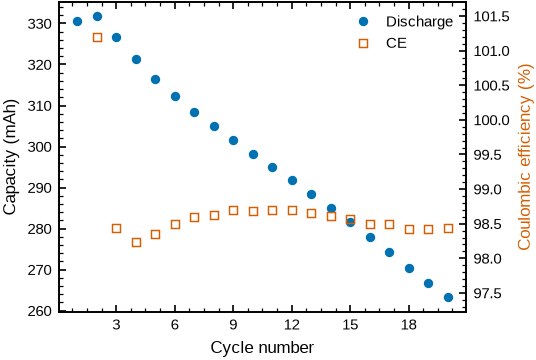
Translated from a recorded session in Chinese; numbers and figure unedited. Sample data: cellpy (MIT).
Works with your tester
- Neware.nda .ndax, BTSDA exports
- LANHE / LandtCSV, TXT
- Arbin.res, CSV, XLSX
- BioLogic.mpt
- Maccor
- BaSyTec
- Digatron
- Novonix
- Gamry
Native files where the format allows, otherwise the tester's text, CSV or Excel export. For an export Cliviq doesn't know, it shows you the first rows, asks which columns hold time, voltage and current, and remembers the answer for the next file. BioLogic .mpr is not supported yet; export to .mpt.
How it works
Install once, then just ask
No scripts, no templates, no uploads. Cliviq gives Claude the tools to read and analyse battery data, and Claude decides which to use.
Install the extension
Download Cliviq and double-click the file. Claude Desktop asks once whether to install it. After that, Cliviq keeps itself up to date.
Sign in once
The first time you ask for something, Cliviq opens your browser. Enter your email, click the link we send, and your 14-day trial starts.
Ask in your own words
In a chat or a Cowork task, point Claude at a folder and ask, in English or Chinese. Figures and tables are saved next to your data.
cycling_NW-1.png .svg .pdf
cycling_NW-1.csv
NW-1_cycles.csv
Figures
Figures you can put straight into a paper
Every figure uses the same layout, fonts and colours, so a thesis chapter or a report looks consistent. Each one comes as PNG, SVG and PDF, with the plotted numbers as CSV.
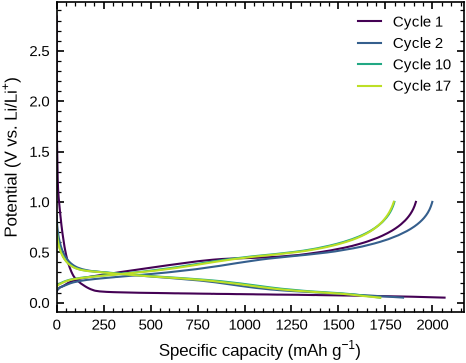
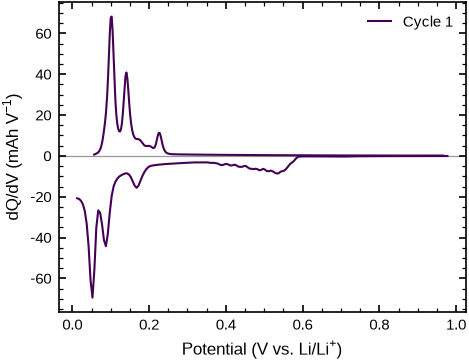
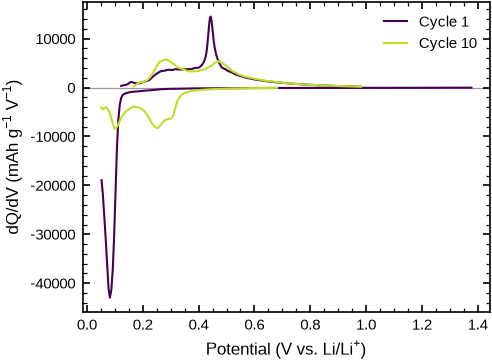
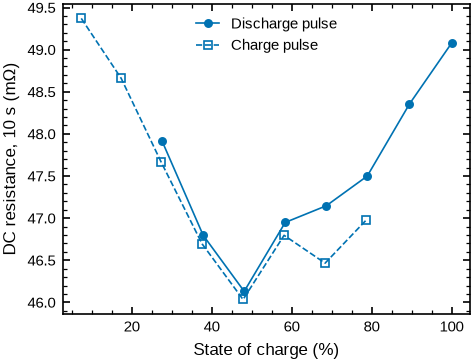
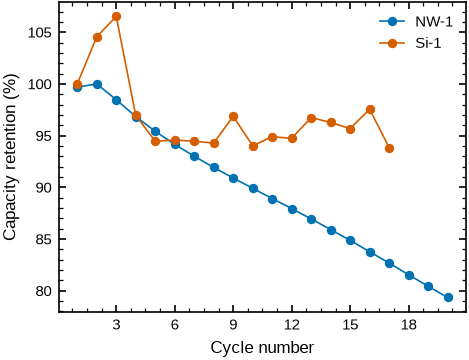
Unedited output from public sample files: cellpy test data (MIT) and the Battery Data Format examples by SINTEF (Apache-2.0). Also available: rate capability, voltage and resistance trends over cycles, and an overview of a whole test.
Checks
Know what your tester actually ran
Cliviq rebuilds the protocol from the measurements and checks every cycle, so a skipped step or a bad channel shows up before you draw conclusions.
Protocol check
Every step, its current and what ended it, rebuilt from the data and written in PyBaMM experiment syntax. Give it the protocol you meant to run, and it lists the differences: pauses, steps that ended on another limit, CV holds that never happened.
## NW-1: protocol as run
1. cycle 1: Rest for 20 seconds
2. cycles 1–20 [cycling]: 20 × Charge at 1.4C until 4.7 V; Rest for 5 minutes; Discharge at 1.4C until 3.9 V; Rest for 5 minutes

Findings: none; every step ended at a limit or after a round time.
Output for the full cell NW-1 from the sample data.
Quality check
Cycles that leave the trend, coulombic efficiency that can't be right, resistance jumps, voltage lost during rests, and the knee where ageing speeds up. When a flagged cycle follows a protocol deviation, Cliviq says so.
CS2_35 · LCO, 1.1 Ah · 936 cycles
Main cycle, 884 times; 17 pauses
No CV hold after the charge in 30 cycles
48 cycles left the capacity trend:
  34 of them ran a different protocol
Knee at cycle 621: fade 2.6 → 16.9 % per 100 cycles
Summary of Cliviq's findings on a public long-term test, CS2_35 from the CALCE battery group, University of Maryland.
It tells you when a question doesn't fit
Ask for a fade curve from a pulse test, or a coulombic efficiency from a file with missing steps, and Cliviq says so instead of drawing something misleading. Then it suggests what does fit.
I couldn't plot a capacity fade for G20M7. The tool reported that the file has no complete charge/discharge cycle, so a fade curve would be empty or misleading.
G20M7 is
HPPC/G20M7.nda, a pulse (HPPC) test.
Privacy
Your data stays on your computer
Cliviq runs as a program on your machine. There is no upload step and no Cliviq cloud for your data.
On your computer
Cliviq reads, converts and plots your files locally, and writes figures and tables next to them. Nothing from your files is sent to us.
In Claude
Claude sees what the tools hand back to the conversation: summaries, tables and previews of the figures, like anything else you share in a chat. Your Claude plan's terms apply.
On our servers
Your email and plan, and for each computer you activate a random ID, its name, operating system and Cliviq version. Payments go through Paddle; we never see your card.
Pricing
One price per person, everything included
Every plan has all figures and checks, and every update. Try it free for 14 days, no card needed.
Academic
$18 per person / month
or $180 a year, two months free
For universities and public research institutes.
- Sign in with your institution's email
- All figures, protocol and quality checks
- Seats for your group, added by email
- Cancel any time
Commercial
$28 per person / month
or $280 a year, two months free
For companies, from R&D to quality control.
- All figures, protocol and quality checks
- Team seats, added or removed any time, charged pro rata
- Invoices with your company details and VAT number
- Cancel any time
Prices in US dollars, excluding VAT or sales tax, which is added at checkout where it applies. Our order process is conducted by our online reseller Paddle.com, the merchant of record for all our orders; it handles payment, invoices and tax.
FAQ
Questions
Anything else: hello@cliviq.com.
What do I need to use Cliviq?
Claude Desktop on macOS or Windows. Cliviq works in ordinary chats and in Cowork tasks that run on your computer. Your Cliviq plan is separate from your Claude plan.
Does Cliviq upload my data?
No. Your files are read on your computer and never reach our servers. Claude sees the summaries and figures the tools return to the conversation, as described under Privacy.
My tester or export isn't listed.
Try it anyway. For an unknown export, Cliviq shows you the first rows, asks which columns hold time, voltage and current, and keeps that mapping for the next files. If a file still won't open, write to hello@cliviq.com.
Who can use the academic plan?
Students and staff of universities and public research institutes, for research and teaching. Sign in with your institution's email address. If your institution isn't recognised, write to us and we'll add it.
How do team seats work?
Buy the number of seats you need, then add colleagues by email on your account page. Seats you add or remove are charged or credited pro rata.
Does it work offline?
Yes. After each licence check, Cliviq keeps working for 14 days without a connection.
What happens when my trial or plan ends?
The tools stop running until you choose a plan. Your files, figures and exports stay where they are, on your computer.
Can I cancel?
Yes, any time, from your account page. Your plan runs to the end of the period you've paid for.
Is Cliviq made by Anthropic?
No. Cliviq is an independent product by ChenLun Innovations. Claude is made by Anthropic.
Early access
Try Cliviq 2 before launch
Cliviq 2 is in early access. Tell us which testers you use and what you'd like to analyse, and we'll send you the extension with a free trial.
Needs Claude Desktop on macOS or Windows. Questions? hello@cliviq.com